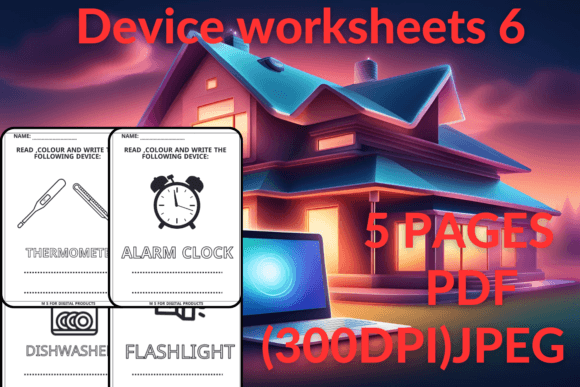
Device Worksheets 6: Engaging Coloring Activities for Kids
In the world of educational design, finding resources that are both visually appealing and genuinely useful can be a challenge. Whether you are a teacher, a homeschooling parent, or a content creator in the education niche, you need materials that bridge the gap between learning and play. This is where the Device Worksheets 6 coloring collection comes in. It is not just a set of generic coloring sheets; it is a curated design asset intended to help children navigate their modern environment.
The core purpose of these worksheets is to introduce young learners to the technological devices they see every day. From tablets to smartphones, these items are now part of a child's daily reality. However, simply showing them the device isn't enough. By combining device recognition with the act of coloring, you create a multi-sensory experience. This process helps improve cognitive skills, fine motor development, and color recognition simultaneously.
A Practical Asset for Educators and Creators
For designers and publishers working in the children’s market, the value of a high-quality, ready-to-use PDF cannot be overstated. The Device Worksheets 6 package is delivered as a ZIP file containing both PDF and JPEG formats. The inclusion of High Quality 300 DPI JPEGs is a significant technical advantage. This resolution ensures that the lines remain crisp and clean, whether you are printing them for a classroom handout or using them as visual elements in a digital project.
The package includes five distinct pages, each focusing on a different aspect of modern technology. This structure allows for a focused learning session. Instead of overwhelming a kindergartner with too much information, you can drip-feed the content, dedicating one session to one specific device. This modularity is a hallmark of good design asset management, allowing for flexibility in how the content is deployed.
Visual Style and Appeal
Visually, the worksheets lean into a clean, vector-style aesthetic. The lines are bold and defined, which is essential for younger children who are still developing their grip and control. There is no ambiguity in the shapes; a tablet looks like a tablet, and a camera looks like a camera. This clarity is crucial for educational materials. The style is approachable and friendly, avoiding the overly complex or "adult" look of technical manuals. Instead, it uses a playful illustration style that invites engagement.
The "personality" of these worksheets is modern and relevant. We have moved past the era where educational materials only depicted farm animals or fruit. While those are still valid, Device Worksheets 6 acknowledges the digital world children are born into. It validates their environment, making the learning process feel immediate and relatable. This relevance increases the likelihood that a child will engage with the material enthusiastically.
Integration into Brand and Product Strategy
If you are a blogger, entrepreneur, or small business owner in the parenting or education space, these worksheets serve as an excellent freebie or lead magnet. Offering high-quality, printable content is a proven strategy to build email lists and foster community trust. By providing a resource that parents can immediately download and use, you solve a real-world problem: keeping kids entertained while learning.
For content creators, the versatility of the JPEG files allows for seamless integration into social media graphics or blog posts. You can use them to illustrate articles about screen time, early childhood education, or gift guides for tech-savvy kids. Because the files are high-resolution, they maintain their professional appearance even when resized or cropped for different platforms like Instagram or Pinterest.
Practical Application and Usability
When incorporating Device Worksheets 6 into your workflow, consider the user experience of your end audience. For a kindergartner or pre-K student, the act of coloring is about more than staying inside the lines. It is about identifying the object. You might pair the worksheet with a real-life example. For instance, if the worksheet features a laptop, have the child look at the family laptop to compare the shapes. This "real-world" connection reinforces the lesson.
From a design perspective, the layout of the pages is balanced. There is enough white space (or uncolored space) to allow for creative expression, but enough structure to guide the child. This balance is difficult to achieve in educational design. Too much empty space can be intimidating for a young artist, while too little makes the page look cluttered and messy. This collection hits a middle ground that feels professional and thoughtful.
Enhancing Engagement Through Interaction
The modern approach to education emphasizes interaction over passive consumption. While a video might entertain a child, a worksheet requires action. The child must choose the colors, hold the crayon, and make decisions. This active participation is vital for brain development. Device Worksheets 6 facilitates this by presenting familiar objects in a new context. It transforms a passive observer of technology into an active participant in understanding it.
Furthermore, these worksheets can be used to spark conversation. As a parent or educator, you can ask questions while the child colors. "What do we use this device for?" or "What color is the screen usually?" These prompts turn a simple coloring activity into a dialogue about technology and its role in our lives. It is a gentle, non-preachy way to introduce concepts of digital literacy.
File Quality and Production
For those concerned with production quality, the 300 DPI specification is the industry standard for print. This ensures that the edges of the illustrations do not pixelate or blur when printed on standard home or office printers. Whether you are printing on A4 or Letter size paper, the aspect ratio and resolution are optimized to prevent distortion. This attention to technical detail saves you time in post-processing or resizing, allowing you to use the assets immediately upon download.
The inclusion of a PDF format ensures that the vector quality is preserved regardless of the viewer's software, while the JPEGs offer flexibility for digital manipulation. This dual-format approach is considerate of the varied workflows of designers and creators. It acknowledges that not everyone has access to advanced design software to manipulate PDFs, while still offering the raw image files for those who do.
Final Thoughts on Value
In a saturated market of children's books and printables, standing out requires quality and relevance. Device Worksheets 6 offers both. It is a niche product that solves a specific problem: teaching kids about the devices they see every day through a tactile, engaging medium. For educators, it is a time-saver. For parents, it is a boredom buster. For creators, it is a valuable asset to add to a library of resources.
By focusing on clear design, high-resolution outputs, and a relevant subject matter, this collection proves that educational materials can be both functional and aesthetically pleasing. It respects the intelligence of the child and the needs of the adult facilitating the activity. Whether you are looking for a freebie to share with your audience or a personal resource for your classroom, these worksheets deliver practical value in a modern package.